
早年的时候,我们做管理后台用extjs比较多,真心说,extjs做管理后台真强大,也好看,相比而言,其他的管理后台ui库就显得粗糙了。但是,extjs真的也太重了。而且,学习成本比较高,还记得当时看源码的时候,十几万行,心里千万个草泥马奔腾而过。
现在比较流行的就是react,vue,angular.在react的组件库中,用的比较多的就是antd了。管理后台页面中,自然是表格居多。antd的table 效果也很丰富,由于早年用extjs ,个人偏好table的高度最大适应效果。就是table 要撑满外面的div ,但是不超过window展示。
antd的固定表头效果就是比较好的,但是,美中不足的是,他是通过设置滚动条的高度来实现固定表头的,那么,我们要实现高度最大适应效果,就无处下手了,我们需要设置的是整个表格组件的高度啊。
所以,解决方案是通过react的高阶组件,来计算出应该给 table-body 多少高度。
1.让项目支持高阶组件
.babelrc
{
  "presets": ["@babel/preset-env","@babel/preset-react" ],
  "plugins": [
    "@babel/plugin-transform-runtime",
    ["@babel/plugin-proposal-decorators", { "legacy": true }],
    ["@babel/plugin-proposal-class-properties",{"loose":true}],
    ["import", { "libraryName": "antd", "libraryDirectory": "es", "style": true }]
  ]
}
2.编写
 /**
 * Created by Bane.Shi.
 * Copyright MoenSun
 * User: Bane.Shi
 * Blog: https://ithere.net/fengxiaotx
 * Date: 2019-08-05
 * Time: 22:45
 */
import * as React from "react";

export function TableFullHoc(WrappedComponent) {

    return class TableFull extends React.Component{

        constructor(props, context) {
            super(props, context);
            this.tableFullRef = React.createRef();
            this.state={
                scrollY: 200,
                parentHeight:0
            }
        }

        componentDidMount() {
            let me = this;
            me.computeY();
            $(window).resize(()=>me.computeY());

        }

        componentWillReceiveProps(nextProps, nextContext) {
            let me = this;
             me.computeY();
        }

        componentDidUpdate(prevProps, prevState, snapshot) {
            let me = this;
            me.computeY();
        }

        computeY=()=>{
            debugger
            let me = this;
            const {parentHeight} = this.state;
            if(this.tableFullRef.current){
                let el = this.tableFullRef.current;

                let parentEl = $(el).parent();
                let tableBodyEl = $(el).find(".ant-table-scroll .ant-table-body");
                let tablePlaceholderEl = $(el).find(".ant-table-scroll .ant-table-placeholder");

                if((parentEl && parentEl.length>0 ) && (tableBodyEl && tableBodyEl.length>0)){
                    let parentHeightNow = parentEl.height();
                    let elHeightNow = $(el).outerHeight(); //获取table 的外层高度
                    let centerHeight = tableBodyEl.outerHeight();
                    if( tablePlaceholderEl && tablePlaceholderEl.length>0 ){
                        centerHeight = centerHeight + tablePlaceholderEl.outerHeight(); //计算出,包裹在table body外面的各种元素的高度总和 ,如果数据为空的时候计算加上默认数据div高度
                    }
                    let otherHeight = elHeightNow - centerHeight; //计算出,包裹在table body外面的各种元素的高度总和
                    if( parentHeightNow !== parentHeight ){
                        let scrollY = parentHeightNow-otherHeight; //滚动条高度,等于parent的高度减去 table body 外面的元素高度
                        if( tablePlaceholderEl && tablePlaceholderEl.length>0 ){
                            tablePlaceholderEl.css("height",scrollY); //即使数据较少,不需要滚动条,body 也撑满div
                        }else {
                            tableBodyEl.css("height",scrollY); //即使数据较少,不需要滚动条,body 也撑满div
                        }
                        me.setState({
                            scrollY: scrollY,
                            parentHeight: parentHeightNow
                        });
                    }
                }

            }
        };

        render() {
            return (
                <div ref={this.tableFullRef}>
                    <WrappedComponent  {...this.props} {...this.state} />
                </div>
            )
        }

    }

}
3.使用高阶组件
/**
 * Created by 落雁沙
 * Copyright MoenSun
 * User: Bane.Shi
 * Blog: http://www.ithere.net/fengxiaotx
 * Date: 2019-08-04
 * Time: 21:49
 */
import * as React from "react";
import PropTypes from 'prop-types';
import UserApi from "../../../../api/user/UserApi";
import { Table, Divider, Tag } from 'antd';
import {TableFullHoc} from "../../../../hoc/TableFullHoc";

@TableFullHoc
class UserList extends React.Component{


    constructor(props, context) {
        super(props, context);
        this.userApi = new UserApi();
        this.state = {
            users:[],
            pageNum:1,
            pageSize: 10
        };
    }

    componentWillMount() {
      //  this.handleQueryUsers();
        this.setState({
            users: [
                {"username":"a"},
                {"username":"b"},
                {"username":"c"},
                {"username":"d"}
            ]
        })
    }

    handleQueryUsers=()=>{
        let me = this;
        const {pageNum,pageSize} = this.state;
        let params = {
            pageNum: pageNum,
            pageSize: pageSize
        };
        this.userApi.queryPaging(params).then((response)=>{
            me.setState({
                users: response.data
            })
        });
    };

    render() {
        const {scrollY} = this.props;
        const {users}=this.state;
        const columns = [
            {
                title: '用户名',
                dataIndex: 'username',
                key: 'username',
            }
        ];
        return (
            <div style={{height:'100%'}}>
                <Table style={{height:'100%'}} columns={columns} dataSource={users} scroll={{ y: scrollY }} pagination={true}    title={() => 'Header'}
                       footer={() => 'Footer'} />
            </div>
        )
    }
}
UserList.propTypes = {
    scrollY: PropTypes.number
};
UserList.defaultProps = {
    scrollY: 200
};
export default UserList
4.看看效果
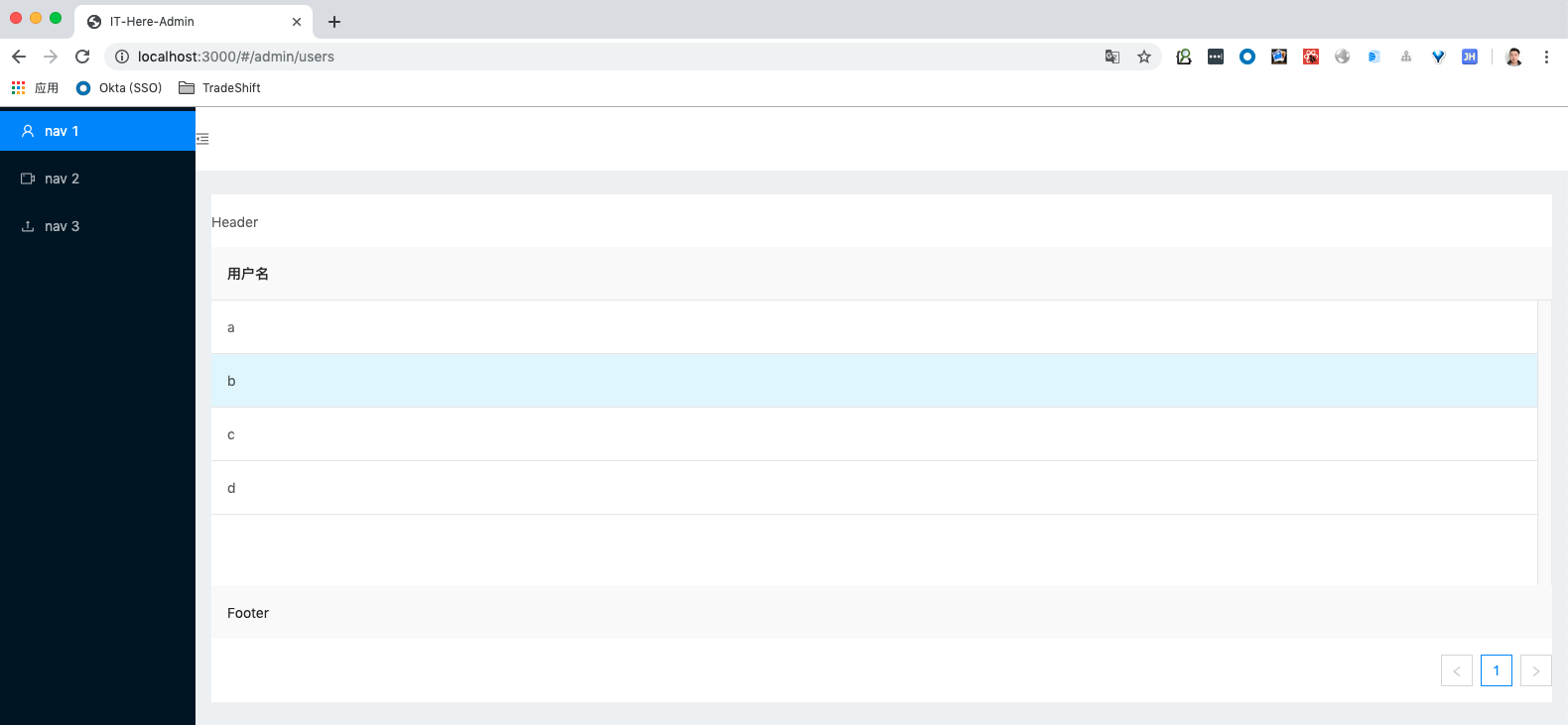
达到预期效果
注意: 如果是异步加载数据的时候,建议不要使用 pagination ,因为,如果一开始没有数据的话,会在加载完数据之后,再显示 pagination ,但是,在子组件渲染完成之后,却不会去通知高阶组件了。这里建议在 footer里直接写 pagination组件。
如果在resize方面有问题的话,可以参考 : http://www.ithere.net/fengxiaotx/article/142